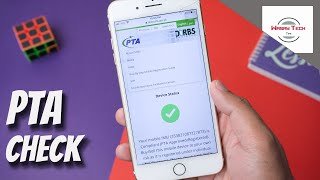
How to Check Mobile PTA Approved or Not New Update 2026
If you are planning to buy a used phone or recently purchased a new device from abroad, the first thing you must check is whether your mobile is PTA approved or not. A PTA-approved phone means your device is legally registered with the Pakistan Telecommunication Authority, and you can use it without any SIM restrictions.
In this guide, you will learn all methods, step-by-step instructions, screenshots guidance, and important tips to avoid blocked or non-approved devices.
More See: PTA Tax Calculator 2025 – Check IMEI & Phone Brands
Why PTA Approval Matters
Before checking approval status, understand why it is important:
- Without PTA approval, your network signals will stop after the 60-day window.
- Non-approved phones cannot use SIM cards in Pakistan.
- You may face IMEI blocking anytime.
- PTA approval ensures your device is legal, safe, and allowed to operate on Pakistani networks.
- It protects users from stolen or blacklisted phones.
Methods to Check Mobile PTA Approved or Not
You can check PTA approval through multiple reliable methods:
- By Sending SMS to 8484
- Through the Official PTA DIRBS Website
- Using the PTA Mobile App (DIRBS App)
- By USSD Code (*#06#) to check IMEI first
- By checking the status on the device box or invoice
Each method is explained in detail below.
1. Check PTA Approval Using SMS to 8484
This is the quickest and easiest method.
Step-by-Step
- Open the Messages app on your mobile.
- Type your IMEI number.
- Send it to 8484.
- Within seconds, you will receive a reply from PTA.
How to Get IMEI?
Dial *#06# → IMEI will appear on your screen.
For dual SIM phones, you will see two IMEI numbers. Send both one by one.
What Replies You Will Get?
PTA may send one of the following messages:
- “Your device is PTA compliant.”
→ Device is fully approved. - “Your device is Non-compliant. Please register within 60 days.”
→ You must pay PTA tax and register urgently. - “Device is blocked.”
→ Phone may be stolen, cloned, or blacklisted.
2. Check PTA Approval Using the DIRBS Official Website
PTA provides a direct IMEI verification portal.
Step-by-Step
- Open your browser (Chrome or Safari).
- Go to:
👉 DIRBS PTA Device Verification Portal (dvs.pta.gov.pk) - Enter your IMEI number.
- Click “Check”.
You Will See One of These Results:
- Compliant → Your device is PTA-approved.
- Non-compliant → Needs registration & tax payment.
- Blocked → IMEI is blacklisted.
- Stolen → Immediately avoid this phone.
This method provides the most accurate, official, and real-time IMEI status.
3. Check PTA Approval Through DIRBS Mobile App
PTA also offers a mobile application for user convenience.
Step-by-Step
- Open Google Play Store or Apple App Store.
- Search “PTA DIRBS”.
- Download & install the app.
- Open the app and enter your IMEI number.
- Tap on Verify.
Features in the App
- Check IMEI status
- Register device
- Pay PTA tax
- View previous checks
- Report stolen phone
This is very helpful for regular verification.
4. Check IMEI First with USSD Code (*#06#)
This step helps ensure the IMEI is valid before checking approval.
Step-by-Step
- Dial *#06#.
- IMEI numbers will appear.
- Copy or note them.
Important Tip
If IMEI does not appear or only shows “0”, it may be a fake or cloned device, which PTA will not approve.
5. Checking PTA Status from Phone Box or Invoice
Many official sellers print PTA Approved Sticker on:
- Mobile box
- Invoice
- Online listing
But Be Careful:
Sometimes fake stickers are used.
Always re-check with the IMEI using method #1 or #2.
Signs Your Phone Is PTA Approved
You can confirm approval by checking these:
- SIM signals work on all networks
- No warning notifications
- No SMS from network: “Register your device”
- PTA verification message shows Compliant
Signs Your Phone Is Not PTA Approved
- SIM stops working
- SMS warnings about non-compliance
- IMEI shows non-approved in DIRBS
- Internet and calls may stop anytime
Common Problems & Solutions
Problem 1: Phone is Non-compliant
✔️ Solution:
Pay PTA tax on the DIRBS portal or choose installment options.
Problem 2: Device Blocked
✔️ Solution:
Avoid buying it. If it’s your phone, contact PTA support.
Problem 3: IMEI Not Found
✔️ Solution:
Device may be cloned or modified — not safe to use.
Tips Before Buying Any Used Phone in Pakistan
- Always check IMEI on the spot.
- Avoid phones without boxes or invoices.
- Never buy a device requiring “PTA tax pending.”
- Check IMEI on both SIM slots.
- Verify with DIRBS website + SMS + App for full confidence.
Final Words
Checking if your mobile is PTA approved or not is extremely important for a smooth and legal mobile experience in Pakistan. Whether you’re buying a new phone, importing one, or using a used device, always verify the IMEI status first.
By following the detailed steps above, you can ensure your device is compliant, secure, and safe to use.
Frequently Asked Questions (FAQs)
1. How do I know if my mobile is PTA approved?
You can check your phone’s PTA status by sending your IMEI to 8484, using the DIRBS website (dvs.pta.gov.pk), or the PTA DIRBS mobile app. If the result shows “Compliant”, your mobile is PTA approved.
2. What does “Compliant” mean in PTA status?
“Compliant” means your phone is fully registered with PTA. You can use any SIM card in Pakistan without restrictions. The device will not be blocked.
3. What does “Non-compliant” mean?
“Non-compliant” means your device is not registered with PTA. You must pay the PTA tax to avoid SIM blockage. After 60 days, a non-compliant device may stop receiving signals.
4. What does “Blocked” mean on the PTA verification result?
“Blocked” means the IMEI is blacklisted. This may happen if the device is stolen, fake, or duplicated. Such phones cannot be used on Pakistani networks.
5. How can I get my IMEI number?
Dial *#06# on your phone.
Your IMEI number will appear instantly.
For dual-SIM mobiles, two IMEI numbers will show — check both.
6. Can I check PTA approval without Internet?
Yes. You can send your IMEI by SMS to 8484 and receive verification results instantly.
7. Is the PTA 8484 service free?
No. Sending an SMS to 8484 has a small fee (usually around Rs. 2–3 including tax).
8. How long does PTA approval take after registration?
Once your payment is made, PTA usually approves the device within a few minutes to a few hours. In rare cases, it may take up to 24 hours.
9. Can I use a SIM card in a non-PTA approved phone?
Yes, but only for 60 days after the device first connects to a Pakistani network. After that period, the phone will be blocked unless registered.
10. Do imported phones need PTA approval?
Yes. All imported phones both new and used must be registered with PTA. Without registration, the device will be blocked after 60 days.
11. Is it safe to buy a non-PTA approved phone?
No. The device may get blocked anytime. You may also have to pay a high PTA tax. Always check IMEI status before purchasing.
12. What if my phone shows “IMEI not valid”?
This means the device may be fake, cloned, or altered. Such phones cannot be registered with PTA and should be avoided at all costs.
13. Can I check PTA status online from a PC or laptop?
Yes. Visit the official DIRBS portal (dvs.pta.gov.pk), enter your IMEI, and click “Check”.
14. Why does my PTA status show different results sometimes?
If you have multiple IMEI numbers, each must be verified separately.
Also, sometimes PTA updates statuses, so checking through both SMS and website is recommended.
15. What should I do if my PTA-approved phone gets blocked?
Contact PTA through their complaint system or helpline. If the device was wrongly blocked, PTA can restore it after verification.
16. Do phones bought from Pakistan always come PTA approved?
Phones purchased from official retailers in Pakistan are usually PTA approved.
However, always double-check the IMEI because some sellers use fake stickers.
17. Can a PTA non-compliant device be approved later?
Yes. You can pay the tax and register it through the PTA portal anytime unless the device is blacklisted or stolen.
18. How do I avoid buying a blacklisted phone?
Always check PTA status through:
- 8484 SMS
- DIRBS website
- DIRBS mobile app
- Ask for original box & invoice
This helps ensure the phone is legal and safe.
19. Why does my phone say “No Service” even after PTA approval?
SIM network issues may be caused by:
- SIM card problem
- Network outage
- Phone hardware fault
If PTA status is compliant, the issue is not related to PTA approval.
20. Does PTA approval transfer if I change SIM or network?
Yes. Once a phone is PTA approved, it stays approved permanently for all networks and SIM cards.